Washing here is easier than at home: the machine adds the products, you pay for everything on one screen and your clothes come out dry. Here's how, in 6 steps.
Prepare your clothes
Before you leave home
No need to bring anything: the washer adds the detergent and softener (up to 95% natural) and the active oxygen by itself.
Check the care label on each garment: it tells you what temperature to wash and dry it at.
Empty the pockets and do up the zips.
Separate whites from colours.
No pet items: their clothes and things, like beds or blankets, can't be washed or dried here. It's a house rule, for hygiene and for anyone with allergies. And if you come with your dog, it waits outside: next to the door there's a pillar with rings to tie the lead.
Choose a washer
Better to give your clothes room to spare
Clothes need room to move around inside to get properly clean. If in doubt, go bigger.
8 kg1 machine. A household load.
13 kg2 machines. Two loads or a single duvet.
17 kg2 machines. Double duvets, blankets and curtains.
Only your clothes go in the washer: you don't need to touch anything else. Close the door and note the number above the machine. You'll need it at the payment station, where you choose and pay for everything.
Paying at the payment station
One screen for everything
Choose your language (top right).
Choose washing or drying.
Select your machine's number.
Choose the programme.They're explained in the next step.
Add an extra if you like.It's optional. You'll find them in the next step.
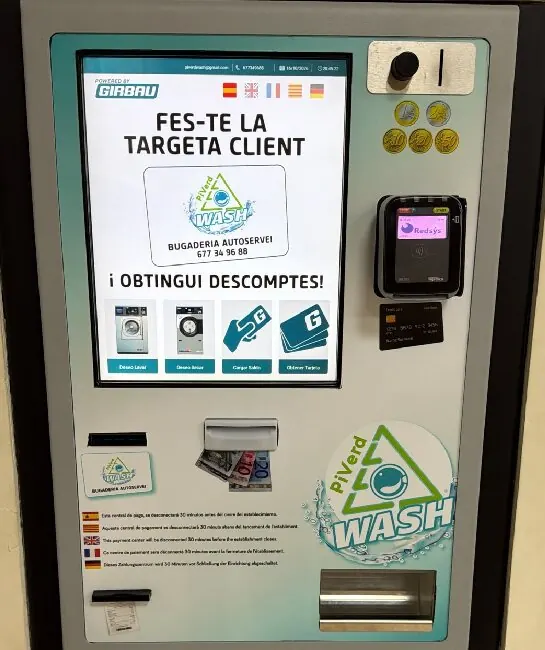
Pay by card, coins, notes or customer card.The machine starts by itself.
A wash costs 5.50 € to 9.00 € depending on the washer, and a dry 3.50 €. Less with a customer card. See prices
With the customer card, every wash and dry costs you less. You can get it and top it up at the payment station itself.
The payment station switches off at 9:30pm, half an hour before closing. If you want to wash and dry, start your wash by 8:45pm at the latest.
Where everything is on the payment station
1234567
Screen Language, top right.
Customer card Into the slot on the left.
Notes In the middle.
Coins Top right.
Bank card Just below the coins.
Receipt Bottom left.
Change Bottom right.
Wash programmes
Which programme should I choose?
There are 4 programmes, each washing at a different temperature. If you're not sure which to use, check the garment's care label: it shows the temperature it can be washed at.
ProgrammeTemperatureTime
HOT50 °C35 min
NORMAL40 °C35 min
COLOR30 °C33 min
DELICADO20 °C33 min
Extras, if you likeExtra wash, rinse or spin
ExtraTimePrice
Extra wash+1 min1.50 €
Extra rinse+1 min1.50 €
Extra spin+3 min1.00 €
Dry
Choose the drying temperature
Move your clothes to a dryer using one of the baskets and close the door. You don't need to touch anything on the dryer either: go back to the payment station, choose drying, then select the dryer number and the programme.
75 °C20 minutes
65 °C20 minutes
50 °C20 minutes
All three cost the same: 3.50 €, or 3.00 € with a customer card. If it needs longer, you can add 7 more minutes for 1.50 € (same price with a customer card). Not sure which temperature? Check the garment's care label.
Before loading it, check there's nothing left in the drum. Don't fill it above the maximum load line on the door, and no shoes or plastic.
Fold
And at home, just put it away
Take your clothes out as soon as it finishes and fold them on the central table, which is 2.50 × 1.25 metres. There's plenty of room to fold a duvet without rushing.
Come back on time: if a machine has finished and its owner isn't there, the next customer can unload it and use it. See the rules
Something not working as it should?
Tell the assistant: it'll help you sort it out and, if it's a fault, let Óscar know. You can also call +34 677 34 96 88.